> For the complete documentation index, see [llms.txt](https://docs.apro.com/en/llms.txt). Markdown versions of documentation pages are available by appending `.md` to page URLs; this page is available as [Markdown](https://docs.apro.com/en/data-pull-evm-chain/api-and-websocket-guide.md).

# API & WebSocket Guide

Domains

<table><thead><tr><th width="221">Description</th><th width="270">Testnet URL</th><th>Mainnet URL</th></tr></thead><tbody><tr><td>REST Endpoint to query specific reports</td><td><a href="http://live-api-test.apro.com">https://live-api-test.apro.com</a></td><td><a href="http://live-api.apro.com">https://live-api.apro.com</a></td></tr></tbody></table>

### Authentication

**Headers**

All routes require the following two headers for user authentication:

<table><thead><tr><th width="177">Header</th><th>Description</th></tr></thead><tbody><tr><td><strong>Authorization</strong></td><td>The user’s unique identifier, provided as a UUID (Universally Unique IDentifier).</td></tr><tr><td><strong>X-Authorization-Timestamp</strong></td><td>The current timestamp, with precision up to milliseconds. The timestamp must closely synchronize with the server time, allowing a maximum discrepancy of 5 seconds (by default).</td></tr></tbody></table>

### API endpoints

1. #### Return a single report at a given timestamp

**Endpoint**

> /api/v1/reports

<table><thead><tr><th width="170">Type</th><th width="199">Description</th><th>Parameter(s)</th></tr></thead><tbody><tr><td>HTTP GET</td><td>Returns a single report for a given timestamp.</td><td><ul><li><strong><code>feedID</code></strong>: A Data Streams feed ID.</li><li><strong><code>timestamp</code></strong>: The Unix timestamp for the report.</li></ul></td></tr></tbody></table>

**Sample request**

> GET /api/v1/reports?feedID=\<feedID>\&timestamp=\<timestamp>

**Sample response**

```json
{
    "report": {
        "feedID": "Hex encoded feedId.",
        "validFromTimestamp": "Report's earliest applicable timestamp (in seconds).",
        "observationsTimestamp": "Report's latest applicable timestamp (in seconds).",
        "fullReport": "A blob containing the report context and body. Encode the fee token into the payload before passing it to the contract for verification.",
        "askPrice": "Ask price.",
        "bidPrice": "Bid price.",
        "midPrice": "Mid price."
    }
}
```

<figure><img src="/files/5BcWXOaMsyEu4U53PzGY" alt=""><figcaption></figcaption></figure>

2. #### Return a single report with the latest timestamp

**Endpoint**

> /api/v1/reports/latest

| Type     | Parameter(s)                          |
| -------- | ------------------------------------- |
| HTTP GET | **`feedID`**: A Data Streams feed ID. |

**Sample request**

> GET /api/v1/reports/latest?feedID=\<feedID>

**Sample response**

```json
{
    "report": {
        "feedID": "Hex encoded feedId.",
        "validFromTimestamp": "Report's earliest applicable timestamp (in seconds).",
        "observationsTimestamp": "Report's latest applicable timestamp (in seconds).",
        "fullReport": "A blob containing the report context and body. Encode the fee token into the payload before passing it to the contract for verification.",
        "askPrice": "Ask price.",
        "bidPrice": "Bid price.",
        "midPrice": "Mid price."
    }
}
```

<figure><img src="/files/oswaMNFutDX7wyH5BLvT" alt=""><figcaption></figcaption></figure>

3. #### Return a report for multiple FeedIDs at a given timestamp

**Endpoint**

> /api/v1/reports/bulk

<table><thead><tr><th width="139">Type</th><th width="180">Description</th><th>arameter(s)</th></tr></thead><tbody><tr><td>HTTP GET</td><td>Return a report for multiple FeedIDs at a given timestamp.</td><td><ul><li><strong><code>feedIDs</code></strong>: A comma-separated list of Data Streams feed IDs.</li><li><strong><code>timestamp</code></strong>: The Unix timestamp for the reports or the string 'latest' for getting the latest reports.</li></ul></td></tr></tbody></table>

**Sample request**

> GET /api/v1/reports/bulk?feedIDs=\<FeedID1>,\<FeedID2>,...\&timestamp=\<timestamp>
>
> GET /api/v1/reports/bulk?feedIDs=\<FeedID1>,\<FeedID2>,...\&timestamp=latest

**Sample response**

```json
{
    "reports": [
        {
            "feedID": "Hex encoded feedId.",
            "validFromTimestamp": "Report's earliest applicable timestamp (in seconds).",
            "observationsTimestamp": "Report's latest applicable timestamp (in seconds).",
            "fullReport": "A blob containing the report context and body. Encode the fee token into the payload before passing it to the contract for verification.",
            "askPrice": "Ask price.",
            "bidPrice": "Bid price.",
            "midPrice": "Mid price."
        },
      //...
    ]
}
```

<figure><img src="/files/3f7oG2tzNZAvzOnO0gcz" alt=""><figcaption></figcaption></figure>

<figure><img src="/files/RJUtOYnGoHYRNwWbCHok" alt=""><figcaption></figcaption></figure>

4. #### Return multiple sequential reports for a single FeedID, starting at a given timestamp

**Endpoint**

> /api/v1/reports/page

<table><thead><tr><th width="143">Type</th><th width="213">Description</th><th>Parameter(s)</th></tr></thead><tbody><tr><td>HTTP GET</td><td>Return multiple sequential reports for a single FeedID, starting at a given timestamp.</td><td><ul><li><strong><code>feedID</code></strong>: A Data Streams feed ID.</li><li><strong><code>startTimestamp</code></strong>: The Unix timestamp for the first report.</li><li><strong><code>limit</code></strong> (optional): The number of reports to return.</li></ul></td></tr></tbody></table>

**Sample request**

> GET /api/v1/reports/page?feedID=\<FeedID>\&startTimestamp=\<StartTimestamp>\&limit=\<Limit>

**Sample response**

```json
{
    "reports": [
        {
            "feedID": "Hex encoded feedId.",
            "validFromTimestamp": "Report's earliest applicable timestamp (in seconds).",
            "observationsTimestamp": "Report's latest applicable timestamp (in seconds).",
            "fullReport": "A blob containing the report context and body. Encode the fee token into the payload before passing it to the contract for verification.",
            "askPrice": "Ask price.",
            "bidPrice": "Bid price.",
            "midPrice": "Mid price."
        },
      //...
    ]
}
```

<figure><img src="/files/rWx2smJdwpsm23cqCCBS" alt=""><figcaption></figcaption></figure>

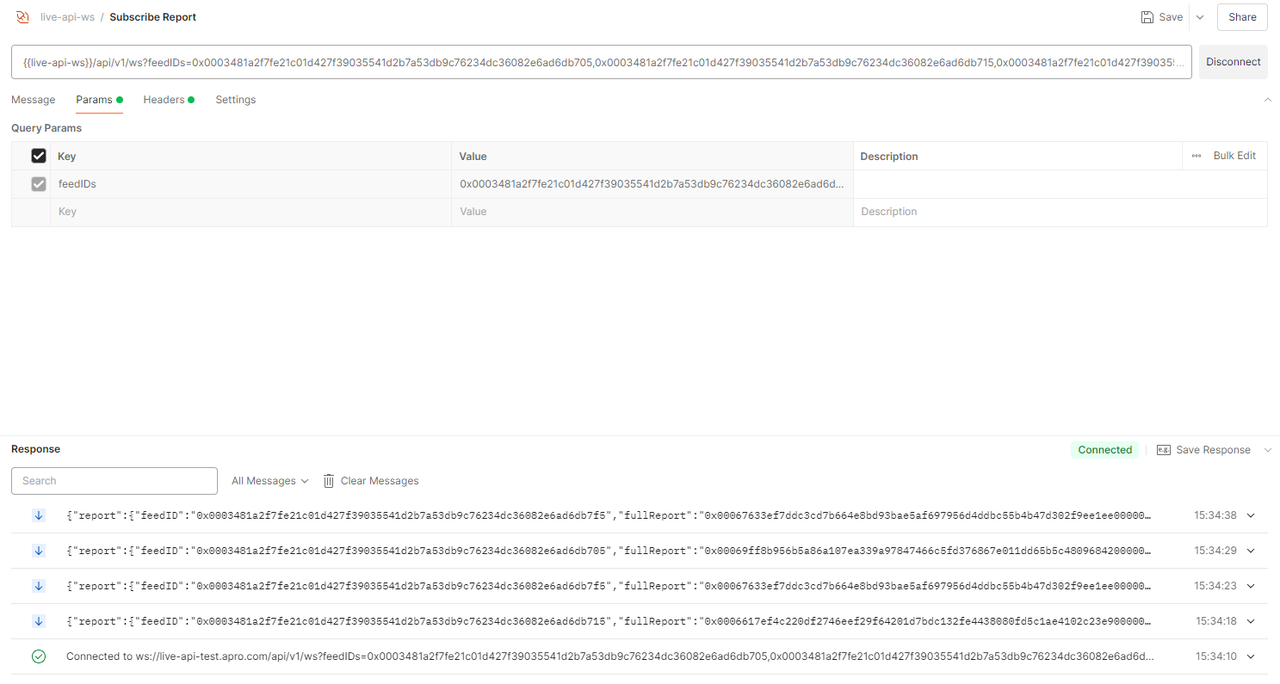
5. #### WebSocket Connection

Establish a streaming WebSocket connection that sends reports for the given feedID(s) after they are verified.

**Endpoint**

> /api/v1/ws

<table><thead><tr><th width="261">Type</th><th>Parameter(s)</th></tr></thead><tbody><tr><td>WebSocket</td><td><strong><code>feedIDs</code></strong>: A comma-separated list of Data Streams feed IDs.</td></tr></tbody></table>

**Sample request**

> GET /api/v1/ws?feedIDs=\<feedID1>,\<feedID2>,...

**Sample response**

```json
{
  "report": {
    "feedID": "hex encoded feedId",
    "fullReport": "a blob containing the report context + body, can be passed unmodified to the contract for verification"
  }
}
```

<figure><img src="/files/7blS25A44QNNaVxx9SAX" alt=""><figcaption></figcaption></figure>

### Error response codes

<table><thead><tr><th width="215">Status Code</th><th>Description</th></tr></thead><tbody><tr><td>400 Bad Request</td><td><p>This error is triggered when:</p><ul><li>There is any missing/malformed query argument.</li><li>Required headers are missing or provided with incorrect values.</li></ul></td></tr><tr><td>401 Unauthorized User</td><td><p>This error is triggered when:</p><ul><li>Authentication fails, typically because the HMAC signature provided by the client doesn't match the one expected by the server.</li><li>A user requests access to a feed without the appropriate permission or that does not exist.</li></ul></td></tr><tr><td>500 Internal Server</td><td>Indicates an unexpected condition encountered by the server, preventing it from fulfilling the request. This error typically points to issues on the server side.</td></tr><tr><td>206 Missing data (<strong><code>/bulk</code></strong> endpoint only)</td><td>Indicates that at least one feed ID data is missing from the report. E.g., you requested a report for feed IDs <strong><code>&#x3C;feedID1></code></strong>, <strong><code>&#x3C;feedID2></code></strong>, and <strong><code>&#x3C;feedID3></code></strong> at a given timestamp. If data for <strong><code>&#x3C;feedID2></code></strong> is missing from the report (not available yet at the specified timestamp), you get <strong><code>[&#x3C;feedID1 data>, &#x3C;feedID3 data>]</code></strong> and a 206 response.</td></tr></tbody></table>